Explore the history of documents (time traveling queries)
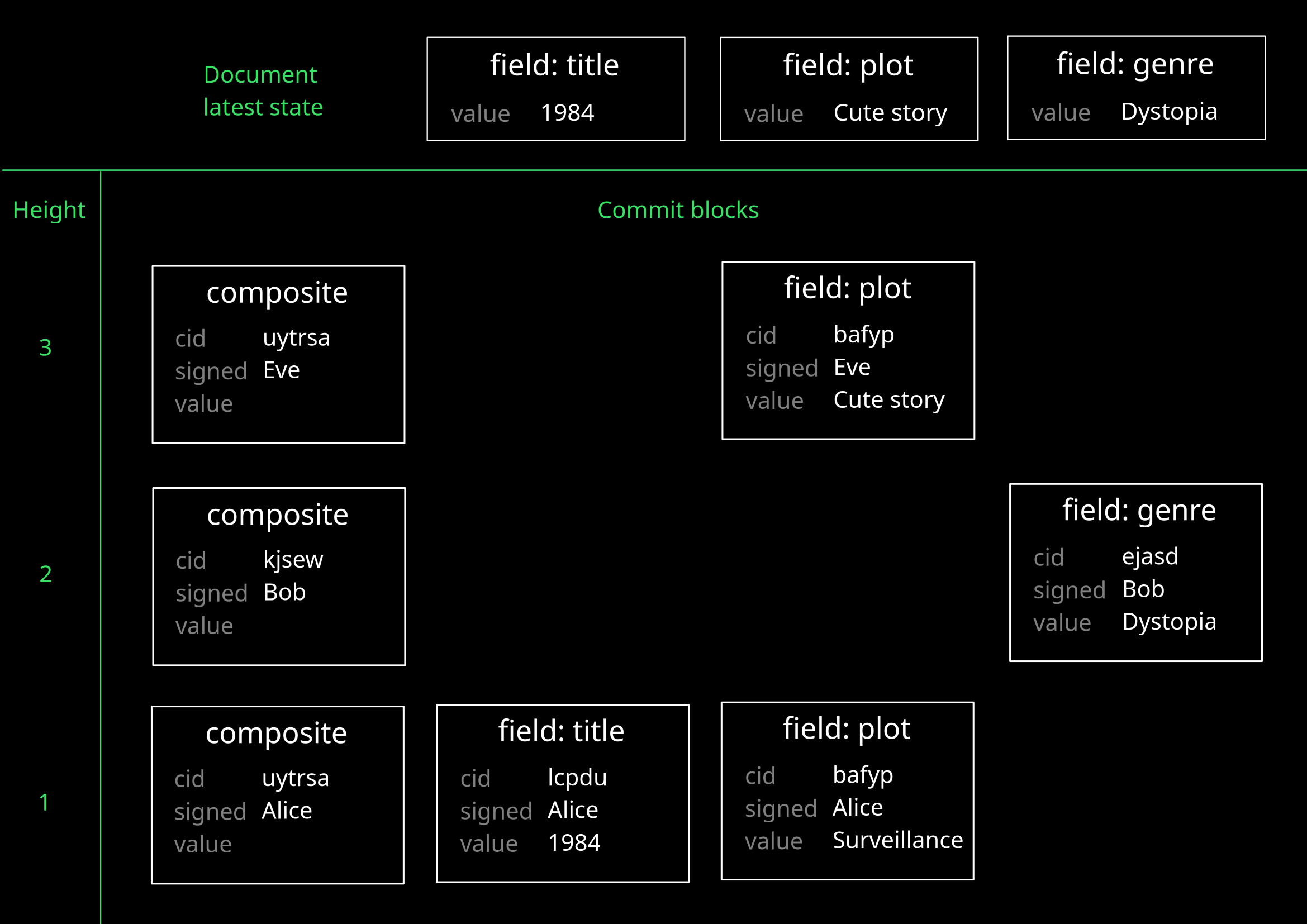
DefraDB's data model is based on MerkleCRDTs: each document has a tree of all of its updates, similar to Git. Every update creates commits, forming a history of changes that leads to the document's current state.
Because commits are linked with cryptographically secure identifiers, the structure of the chain guarantees data integrity by design. Some of the advantages are:
- Backups – You don't have to retain documents previous versions, as older versions of each document are always available.
- Auditability – You don't have to keep a log of changes for auditing purposes, as the history of each document provides such log. Each entry is signed by the identity responsible of the change.
Display database setup
To reproduce the example results from this page, your database needs the following setup.
type Book {
  title: String!
  genre: String
  plot: String
}
Query for commits (_commits queries)
Syntax
- _commits query
- Commit object
query {
  _commits(
    cid: [ID],
    collectionVersionId: String,
    depth: Int,
    docID: ID,
    filter: CommitsFilterArg,
    groupBy: [commitFields],
    limit: Int,
    offset: Int,
    order: [commitsOrderArg]
  ) [Commit]
}
cid– Unique identifier of one (or more) commit.collectionVersionId– ID of the collection version that the commit targeted. Allows you to determine the state of the data model when the change was committed.depth– Position within the chain of commits this one commit is located at (counting from the latest commit). Commits at levels up to the given depth are included.-1returns blocks at any depth.docID– ID of document involved in the commits.filter– Restrict which commit blocks to retrieve. See Filter commits for usage.groupBy– Organize returned commits into groups. See DQL -> Group results for usage.limit– Maximum number of commits to return.offset– Number of commits to skip from the return list (pagination).order– How to sort results. See DQL -> Order results for usage.
type Commit {
  cid: ID
  collectionVersionId: String
  docID: ID
  delta: String
  fieldName: String
  heads(docID, cid, filter, groupBy, order): [Commit]
  height: Int
  links(docID, cid, filter, groupBy, order): [Commit]
  signature: Signature
}
cid– Unique identifier of a commit, resulting from the hash of its content.collectionVersionId– ID of the collection version that the commit targeted. Determines the state of the data model when the change was committed.docID– ID of document involved in the commits.delta– The content of the commit, as a base64-encoded CBOR value.fieldName– Name of the field that this commit relates to. The value is"_C"for composite blocks andnullfor collection blocks.heads– Parent commits in the tree that build the history of this piece of data. Linked blocks are at different depths, and of the same type.height– Location of the commit in the tree (counting from the root commit). All commits from add operations have a height of1; subsequent updates increment the counter by one for new commits.links– Child commits in the tree that contribute to the composition of this commit. Linked blocks are at the same depth, and of different types. Composite commits link to the field commits for the fields that the mutation altered; collection commits link to composite commits.signature– Commit's signature. Used to verify the commit's integrity. See Security -> Signatures.
Commits on document creation
Create a new document to observe what commits the operation generates.
mutation {
  add_Book(input: {
    title: "1984",
    plot: "A masterpiece of rebellion and imprisonment where war is peace, freedom is slavery, and Big Brother is watching."
  }) { _docID title }
}
{
  "data": {
    "add_Book": [
      {
        "_docID": "bae-8a8a0eca-7fe4-5ea4-964e-bbf708253d96",
        "title": "1984"
      }
    ]
  }
}
To retrieve the commits that resulted from the document creation, use a _commits query with the docID of the created document.
query {
  _commits(docID: "bae-8a8a0eca-7fe4-5ea4-964e-bbf708253d96") {
    fieldName
    cid
    delta
    height
    links {
      cid
      fieldName
    }
    heads {
      cid
      fieldName
    }
    signature {
      identity
      type
      value
    }
  }
}
In this case, there are three commit blocks:
- two are for the individual fields
titleandplot; - the third is the composite (
_C) block, which references the field blocks through thelinkslist. You can think of the composite block as a directory containing files.
Each commit is uniquely identified by its cid (Content ID) field. The delta field contains the data payload that was saved into the storage. At height: 1, all blocks are signed by the identity who submitted the query.
{
  "data": {
    "_commits": [
      {
        "cid": "bafyreigfmpvezc4efqf27qjlmdvhoiewjbzzfhbphrjcbn5np3azgys3pa",
        "delta": "eHBBIG1hc3RlcnBpZWNlIG9mIHJlYmVsbGlvbiBhbmQgaW1wcmlzb25tZW50IHdoZXJlIHdhciBpcyBwZWFjZSwgZnJlZWRvbSBpcyBzbGF2ZXJ5LCBhbmQgQmlnIEJyb3RoZXIgaXMgd2F0Y2hpbmcu",
        "fieldName": "plot",
        "heads": [],
        "height": 1,
        "links": [],
        "signature": {
          "identity": "023531430d1053f4eeab4bf520522186698d7e16d53cf0e80df35a158c7a74261e",
          "type": "ES256K",
          "value": "MEUCIQDd0qjbTLAWH2egv3qMKE7afW8O/Ki1Wgum2bwBP/ziHAIgBBtDcYgqdBCUs1P+pV2ZYr/awSd10FkXiGCPKCDk944="
        }
      },
      {
        "cid": "bafyreifeswomzh7doh34t6pcukrktrf4vimazuf32uywrststovczq45ua",
        "delta": "ZDE5ODQ=",
        "fieldName": "title",
        "heads": [],
        "height": 1,
        "links": [],
        "signature": {
          "identity": "023531430d1053f4eeab4bf520522186698d7e16d53cf0e80df35a158c7a74261e",
          "type": "ES256K",
          "value": "MEUCIQD+lDOW0s823sHqR0BSOTXirlQNAqgsE1nHf2EIgNaLdAIgQ/K+kUExpeu8B9He1Mt2mS4dJB8Qu+Ux07/Xg9Ce6CE="
        }
      },
      {
        "cid": "bafyreidgr7rwyheskxqrmm6lwfacgc7vbiukenv2ppah562avd25rljkcu",
        "delta": null,
        "fieldName": "_C",
        "heads": [],
        "height": 1,
        "links": [
          {
            "cid": "bafyreifeswomzh7doh34t6pcukrktrf4vimazuf32uywrststovczq45ua",
            "fieldName": "title"
          },
          {
            "cid": "bafyreigfmpvezc4efqf27qjlmdvhoiewjbzzfhbphrjcbn5np3azgys3pa",
            "fieldName": "plot"
          },
        ],
        "signature": {
          "identity": "023531430d1053f4eeab4bf520522186698d7e16d53cf0e80df35a158c7a74261e",
          "type": "ES256K",
          "value": "MEQCIF+kaBWv+EBm4148UXrAmDICrMqBOe0fsaVedfG4ugZBAiA8VenGRQdlp8oGqr+0pZ90VhgDgRwG5mnNY0KRc237LA=="
        }
      }
    ]
  }
}
Commits on document update
When a document is updated or deleted, its commit block are not altered. Written commits remain unchanged (unless the document is truncated, in which case all corresponding blocks are removed) and more commits are appended to the old ones, creating a history of changes that leads to the present moment. These commit blocks create a Directed Acyclic Graph (DAG).
Update the previous document, adding a value for the field genre, to see what blocks are appended to the history when the document is altered.
mutation {
  update_Book(
    docID: "bae-8a8a0eca-7fe4-5ea4-964e-bbf708253d96",
    input: {
      genre: "Dystopia"
    }
  ) { _docID title genre }
}
{
  "data": {
    "update_Book": [
      {
        "_docID": "bae-8a8a0eca-7fe4-5ea4-964e-bbf708253d96",
        "genre": "Dystopia",
        "title": "1984"
      }
    ]
  }
}
To retrieve the commits resulting from the update mutation, select the latest composite and return its linked blocks. The result shows the genre field block connected to the top composite block, and the previous composite block in the history referenced in the heads list.
query {
  _commits(
    docID: "bae-8a8a0eca-7fe4-5ea4-964e-bbf708253d96",
    filter: { fieldName: { _eq: "_C" } },
    depth: 1
  ) {
    fieldName
    height
    links {
      fieldName
      delta
    }
    heads {
      fieldName
    }
  }
}
{
  "data": {
    "_commits": [
      {
        "fieldName": "_C",
        "heads": [
          {
            "fieldName": "_C"
          }
        ],
        "height": 2,
        "links": [
          {
            "delta": "aER5c3RvcGlh",
            "fieldName": "genre"
          }
        ]
      }
    ]
  }
}
Blocks for the same field name at different heights build a history chain via their heads, each new one referencing the previous one via its cid. Because the cid is a cryptographically secure value (the hash of the whole block), the structure of the chain guarantees data integrity by itself: if any part of the data is tampered with, the history chain becomes invalid.
The example above queries for the top composite block and fetches its links. This ensures that only blocks created as result of the latest database operation are returned. This is different from querying for commits at depth: 1: such a query returns a view of the latest state of the document, as it yields the top layer for blocks of all types, regardless of their height value.
query {
  _commits(docID: "bae-8a8a0eca-7fe4-5ea4-964e-bbf708253d96", depth: 1) {
    fieldName
    height
  }
}
{
  "data": {
    "_commits": [
      {
        "fieldName": "genre",
        "height": 1
      },
      {
        "fieldName": "plot",
        "height": 1
      },
      {
        "fieldName": "title",
        "height": 1
      },
      {
        "fieldName": "_C",
        "height": 2
      }
    ]
  }
}
Even if genre was updated in the second query, it has height: 1 because it is the first block for the field. On the other hand, title and plot have height: 1 because they were not changed in the second query, so there are no blocks on top of them. The top composite block has instead height: 2, because the current state was built over two operations.
Filter commits
You can restrict the commits result to a subset of blocks via the filter argument to _commits queries.
- Single filter – Restrict blocks to a specific field name (or composite/collection blocks).
- Composite filter – Restrict blocks to an
and/orcombination of fields.
Single filter
filter: {
  fieldName: {
    <scalar-operator>: <field>
  }
}
<scalar-operator>– Operator to use for comparison. Supported values:_eq,_neq,_in,_nin. For more information, see DQL -> Filter operators.<field>– Field value to filter against ("_C"for composite blocks,nullfor collection blocks).
query {
  _commits(
    docID: "bae-8a8a0eca-7fe4-5ea4-964e-bbf708253d96",
    depth: 1,
    filter: { fieldName: { _eq: "_C" } }
  ) {
    fieldName
    height
  }
}
{
  "data": {
    "_commits": [
      {
        "fieldName": "_C",
        "height": 2
      }
    ]
  }
}
query {
  _commits(
    docID: "bae-8a8a0eca-7fe4-5ea4-964e-bbf708253d96",
    depth: 1,
    filter: { fieldName: { _eq: "title" } }
  ) {
    fieldName
    height
  }
}
{
  "data": {
    "_commits": [
      {
        "fieldName": "title",
        "height": 1
      }
    ]
  }
}
Composite filter
filter: {
  <logical-operator>: [
    {
      fieldName: {
        <scalar-operator>: <field>
      }
    },
    ...
  ]
}
<logical-operator>– Logical operator to combine the list of field conditions. Supported values:_or,_and.<scalar-operator>– Operator to use for comparison. Supported values:_eq,_neq,_in,_nin. For more information, see DQL -> Filter operators.<field>– Field value to filter against ("_C"for composite blocks,nullfor collection blocks).
query {
  _commits(
    docID: "bae-8a8a0eca-7fe4-5ea4-964e-bbf708253d96",
    depth: 1,
    filter: {
      _or: [
        { fieldName: { _eq: "title" } },
        { fieldName: { _eq: "plot" } }
      ]
    }
  ) {
    fieldName
    height
  }
}
{
  "data": {
    "_commits": [
      {
        "fieldName": "plot",
        "height": 1
      },
      {
        "fieldName": "title",
        "height": 1
      }
    ]
  }
}
Get document or field at specific commit
To retrieve a document as it was in a previous state, get the cid of the composite block referencing that state, and use it to query the document type.
query {
  Book(cid: "bafyreidgr7rwyheskxqrmm6lwfacgc7vbiukenv2ppah562avd25rljkcu") {
    title
    plot
  }
}
{
  "data": {
    "Book": [
      {
        "plot": "A masterpiece of rebellion and imprisonment where war is peace, freedom is slavery, and Big Brother is watching.",
        "title": "1984"
      }
    ]
  }
}
Querying a document by its cid returns that single document's historical state. Any linked documents, for example via relationships, are not sourced from the same point in time.
You can also use the cid of a field block, but information about other fields won't be shown. For example, querying Book with a cid relating to an update for title shows the field plot has value null.
query {
  Book(cid: "bafyreifeswomzh7doh34t6pcukrktrf4vimazuf32uywrststovczq45ua") {
    title
    plot
  }
}
{
  "data": {
    "Book": [
      {
        "plot": null,
        "title": "1984"
      }
    ]
  }
}
To include the state of all fields, use the composite commit at the same height.
Get commit history for a document
Include the _version sub-object in the return set to retrieve the document's commit history. The whole commit chain is surfaced in this way. Although the return only includes composite blocks, you can include the related field commits by returning the composite's links.
query {
  Book {
    title
    _version {
      fieldName
      links {
        fieldName
        delta
      }
    }
  }
}
{
  "data": {
    "Book": [
      {
        "_version": [
          {
            "fieldName": "_C",
            "links": [
              {
                "delta": "aER5c3RvcGlh",
                "fieldName": "genre"
              }
            ]
          },
          {
            "fieldName": "_C",
            "links": [
              {
                "delta": "ZDE5ODQ=",
                "fieldName": "title"
              },
              {
                "delta": "eHBBIG1hc3RlcnBpZWNlIG9mIHJlYmVsbGlvbiBhbmQgaW1wcmlzb25tZW50IHdoZXJlIHdhciBpcyBwZWFjZSwgZnJlZWRvbSBpcyBzbGF2ZXJ5LCBhbmQgQmlnIEJyb3RoZXIgaXMgd2F0Y2hpbmcu",
                "fieldName": "plot"
              }
            ]
          }
        ],
        "title": "1984"
      }
    ]
  }
}
Performance remarks
- The latest version of each document is cached, so the database never has to read through the history chain to build the present version of the data. The performance for retrieval of a document's latest state is independent of the size of its history.
- When a document's historical state is requested, the database follows the commit chain backwards until its root and then replays forward all the changes until the requested
cidto re-build the document's requested state. The complexity of retrieving an historical state is thus proportional to the depth of the document's history.